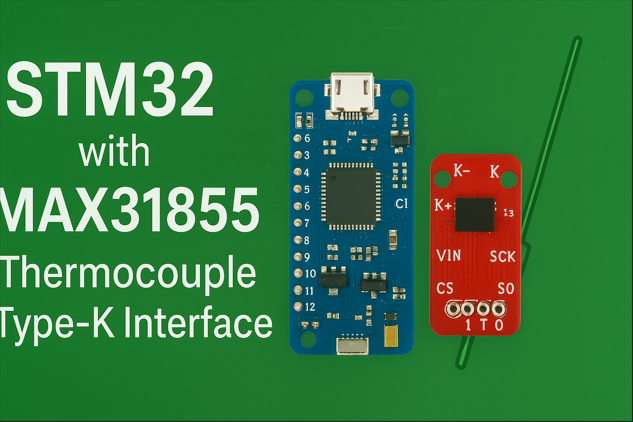
When working on MAX31855 STM32 interface projects, accuracy and reliability are critical for industrial temperature sensing applications. Whether for furnace control or process automation, the right sensor defines how stable your system will be.
In this post, we’ll see how to connect the MAX31855 thermocouple-to-digital converter with an STM32 microcontroller using SPI. Basically, this project reads data from a Type-K thermocouple and sends it over UART — perfect for automation engineers or embedded devs who need precise temperature readings in real industrial setups.
We’ll check the full code, understand how it works, and also see why MAX31855 gives way better performance than common sensors like AHT25 or DHT11 when it comes to high temp measurement.
Why MAX31855?
The MAX31855 (from Analog Devices, earlier Maxim) is a cold-junction compensated thermocouple-to-digital IC. It supports Type-K thermocouples and gives direct temperature readings in Celsius (14-bit resolution). So no need for extra analog circuits or op-amps.
Main specs:
- Works with Type-K thermocouples
- 14-bit resolution, ±2°C accuracy
- Built-in cold junction compensation
- SPI digital output (32-bit data frame)
- Detects faults like open thermocouple or shorts
For ovens, heaters, CNC, or boilers, this sensor gives much higher accuracy than DHT22 or AHT25 which are mostly for humidity and not made for high temp range.
For industrial applications like ovens, heaters, boilers, and CNC machines, this sensor provides much higher accuracy than low-cost humidity sensors such as AHT11, AHT25, or DHT22, which are not designed for high-temperature ranges or precision readings.
Hardware Setup
To replicate this project, you’ll need:
- STM32 microcontroller board (e.g., STM32F103C8T6 “Blue Pill” or Nucleo board)
- MAX31855 breakout board
- K-type thermocouple probe
- UART to USB converter (for viewing serial output on PC)
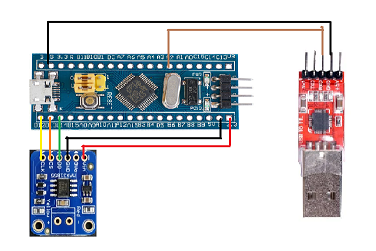
The MAX31855 STM32 interface allows fast SPI communication for precise thermocouple data conversion.
SPI Pin Connections
| MAX31855 Pin | STM32 Pin | Description |
|---|---|---|
| CS | PB12 | Chip Select (GPIO Output) |
| SCK | PB13 | SPI Clock |
| SO (DO) | PB14 | MISO |
| VCC | 3.3V | Power Supply |
| GND | GND | Ground |
The MAX31855 communicates using SPI (Serial Peripheral Interface). The STM32 acts as the SPI master and reads 32-bit data frames from the MAX31855.
In this section, we’ll configure the SPI peripheral for our MAX31855 STM32 interface project.
STM32CubeMX Configuration
MCU Selection:
- Part Number: STM32F103C6 or Other MCU’s
- Clock Source: Internal 8 MHz (HSI or external crystal if available)
SPI Configuration (for MAX31855):
- Mode: Full-Duplex Master
- Prescaler: 32 → SPI Clock ≈ 250 kHz (safely below MAX31855 5 MHz limit)
- Clock Polarity (CPOL): Low
- Clock Phase (CPHA): 1st Edge
- Frame Format: 8-bit data
- NSS (CS): Software controlled
GPIO Configuration:
- PA12 → GPIO_Output (Manual Chip Select for MAX31855)
- SPI1_SCK → PA13
- SPI1_MISO → PA14
- SPI1_MOSI → Not Used (MAX31855 is read-only device)
USART1 Configuration (for Serial Output):
- Mode: Asynchronous
- Baud Rate: 9600
- Word Length: 8 Bits
- Parity: None
- Stop Bits: 1
- TX → PA9
- RX → PA10
Code Generation:
- Go to Project → Generate Code
- Choose STM32CubeIDE as the toolchain
- Click Generate Code
- Open the project in STM32CubeIDE and start writing your application code to read data from the MAX31855 via SPI and print results via UART.
The MAX31855 STM32 interface firmware reads 32-bit temperature data and converts it into human-readable values.
STM32 Firmware Overview
This project consists of three main files:
- main.c – Application code and UART handling
- max31855.c – Driver functions to communicate with the sensor
- max31855.h – Header file with definitions and function declarations
Let’s dive into each one.
Connecting the MAX31855 STM32 Interface via SPI
main.c – Application Code
The main.c file handles initialization, communication, and the main temperature-reading loop.
Initialization and Setup
HAL_Init();
SystemClock_Config();
MX_GPIO_Init();
MX_SPI2_Init();
MX_USART1_UART_Init();
These lines initialize the STM32 peripherals:
- HAL_Init() – Initializes the Hardware Abstraction Layer.
- SystemClock_Config() – Configures the system clock for high performance.
- MX_GPIO_Init(), MX_SPI2_Init(), and MX_USART1_UART_Init() – Initialize GPIOs, SPI2, and UART1 respectively.
The UART is configured at 9600 baud rate to send temperature readings to the PC.
UART and Sensor Initialization
HAL_UART_Receive_IT(&huart1, &rx_data, 1);
HAL_UART_Transmit(&huart1,(uint8_t*)MSG0,sizeof(MSG0),100);
This enables UART interrupt reception and sends a message indicating that the sensor is being initialized.
Then the sensor initialization function is called:
if (!begin()) {
    HAL_UART_Transmit(&huart1,(uint8_t*)MSG1,sizeof(MSG1),100);
    while (1) HAL_Delay(10);
}
If the MAX31855 fails to initialize, the program halts and continuously sends “ERROR”. Otherwise, it proceeds to read data.
Reading and Displaying Temperature
Inside the main loop:
double c = readCelsius();
if (!isnan(c)) {
    sprintf(MSG10, "C = %f \n\r", c);
    HAL_UART_Transmit(&huart1, (uint8_t*)MSG10, sizeof(MSG10), 100);

    sprintf(MSG8, "F = %f \n\r", readFahrenheit());
    HAL_UART_Transmit(&huart1, (uint8_t*)MSG8, sizeof(MSG8), 100);
    HAL_Delay(1000);
}
else {
    HAL_UART_Transmit(&huart1, (uint8_t*)MSG3, sizeof(MSG3), 100);
    uint8_t e = readError();
    if (e & MAX31855_FAULT_OPEN)
        HAL_UART_Transmit(&huart1, (uint8_t*)MSG4, sizeof(MSG4), 100);
}
Here’s what happens:
- The temperature in Celsius is read using
readCelsius(). - If valid, it prints both Celsius and Fahrenheit readings via UART.
- If invalid (NaN), it detects and prints the fault (open thermocouple, etc.).
- A 1-second delay provides stable readings.
UART Receive Callback
The function below handles UART commands:
void HAL_UART_RxCpltCallback(UART_HandleTypeDef *huart)
It stores characters received through UART until a carriage return (\r) is detected. This can be extended to receive commands from a PC terminal — useful for controlling the system or requesting data dynamically.
max31855.h – Header File
This header defines constants and function prototypes for the MAX31855 driver.
Important definitions:
#define MAX31855_FAULT_NONE (0x00)
#define MAX31855_FAULT_OPEN (0x01)
#define MAX31855_FAULT_SHORT_GND (0x02)
#define MAX31855_FAULT_SHORT_VCC (0x04)
#define MAX31855_FAULT_ALL (0x07)
These bitmasks identify specific fault conditions in the thermocouple.
Declared functions:
bool begin(void);
double readInternal(void);
double readCelsius(void);
double readFahrenheit(void);
uint8_t readError(void);
void setFaultChecks(uint8_t faults);
uint32_t spiRead32(void);
max31855.c – Sensor Driver
This file handles all communication with the MAX31855 through SPI.
Initialization Function
bool begin(void) {
    if (HAL_SPI_Init(&hspi2) == HAL_OK)
        initialized = true;
    else
        initialized = false;
    return initialized;
}
This ensures the SPI peripheral is configured before any communication begins.
Reading Internal Temperature
double readInternal(void) {
    uint32_t v = spiRead32();
    v >>= 4;
    float internal = v & 0x7FF;
    if (v & 0x800) {
        int16_t tmp = 0xF800 | (v & 0x7FF);
        internal = tmp;
    }
    internal *= 0.0625;
    return internal;
}
The internal temperature reading comes from the cold-junction sensor inside the MAX31855. This compensates for temperature differences between the thermocouple junction and the chip.
Reading Thermocouple Temperature
double readCelsius(void) {
    int32_t v = spiRead32();
    if (v & faultMask) return NAN;

    if (v & 0x80000000)
        v = 0xFFFFC000 | ((v >> 18) & 0x000003FF);
    else
        v >>= 18;

    double centigrade = v * 0.25;
    return centigrade;
}
The 32-bit data from MAX31855 is processed as:
- Bits [31:18] – Thermocouple temperature
- Bits [15:4] – Internal (cold junction) temperature
- Bits [2:0] – Fault flags
Each LSB in the thermocouple temperature represents 0.25°C.
Reading Fault Codes
uint8_t readError() {
    return spiRead32() & 0x7;
}
This function checks for open, short-to-ground, or short-to-VCC faults.
Reading Data Over SPI
uint32_t spiRead32(void) {
    uint32_t d = 0;
    uint8_t buf[4];

    HAL_GPIO_WritePin(GPIOB, GPIO_PIN_12, GPIO_PIN_RESET);
    HAL_SPI_Receive(&hspi2, buf, sizeof(buf), SPI_DELAY);
    HAL_GPIO_WritePin(GPIOB, GPIO_PIN_12, GPIO_PIN_SET);

    d = (buf[0] << 24) | (buf[1] << 16) | (buf[2] << 8) | buf[3];
    return d;
}
The STM32 pulls the CS (Chip Select) line low to start communication, receives 4 bytes of data, and then pulls CS high. The bytes are combined to form a 32-bit word containing temperature and fault information.
Once you upload the code, the MAX31855 STM32 interface starts sending temperature data through UART at 9600 baud.
Testing the System
Once flashed, connect the STM32 UART pins (TX/RX) to a USB-UART converter and open any serial terminal (like PuTTY or Arduino Serial Monitor) at 9600 baud.
You’ll see messages such as:
Initializing sensor...
SENSOR OK.
C = 28.25
F = 82.85
If the thermocouple is disconnected, it will display:
Thermocouple fault(s) detected!
FAULT: Thermocouple is open - no connections.
This makes it extremely reliable for real-time temperature monitoring in industrial or automation applications.
Why MAX31855 Beats AHT25 or DHT Sensors in Precision
Compared to AHT25 or DHT sensors, the MAX31855 STM32 interface performs significantly better in high-temperature environments.
| Parameter | MAX31855 | AHT25 / DHT11 |
|---|---|---|
| Temperature Range | −200°C to +1350°C | 0°C to +80°C |
| Accuracy | ±2°C | ±2~3°C (only for room temp) |
| Interface | SPI | I2C or Single-Wire |
| Response Time | < 0.1s | 2–3s |
| Use Case | Industrial / Furnace / Metal works | Room temperature / humidity sensing |
The MAX31855 directly interfaces with thermocouples, offering high-temperature support and fast response, unlike digital humidity sensors that saturate or fail above 80°C.
Real-World Industrial Applications
This setup is useful in:
- Industrial ovens and furnaces
- Solder reflow stations
- Plastic injection molding
- Food processing and temperature control systems
- Laboratory automation
- Industrial data acquisition units
With STM32’s stability and the MAX31855’s precision, this project offers a robust, cost-effective, and scalable solution for any automation system.
Conclusion
In summary, this MAX31855 STM32 interface project provides a low-cost yet highly accurate industrial temperature measurement solution.
We successfully interfaced the MAX31855 thermocouple sensor with an STM32 microcontroller to achieve accurate industrial-grade temperature measurements. The project uses SPI for fast digital communication and UART for serial data monitoring.
Unlike typical digital humidity sensors (AHT25, DHT11, etc.), the MAX31855 provides professional-level precision and fault detection, making it the right choice for industrial automation engineers and embedded developers working with high-temperature environments.
This example code can easily be expanded with an LCD, OLED, or Modbus RTU interface for use in factory automation or IoT temperature logging systems.
Also read: MAX31855 datasheet
Author’s Note:
This project is a great resource for developers who want to learn practical industrial interfacing using STM32 and SPI sensors. The MAX31855’s accuracy and simplicity make it one of the most trusted thermocouple solutions in embedded engineering.
Keywords
MAX31855 STM32 interface, thermocouple sensor project, industrial temperature monitoring, STM32 SPI example, MAX31855 code STM32, STM32 UART temperature, embedded system project, industrial automation sensor, accurate temperature measurement, C code for MAX31855.