STM32 Dual UART Communication plays a vital role when you need to read data from multiple sensors like NDIR gas sensors and send processed values to another system in real time. When I start this project, I had a simple goal – to read the NDIR gas sensor output and use that data together with other sensor readings to control the motor and flow system using STM32, Im used STM32F103C8T6 BluePill MCU. But after connecting the NDIR sensor to STM32, I found that it was not so simple like I expected. The NDIR sensor I used gives output in 4–20mA current loop and also have UART TX/RX communication. At first, I thought to use the 4 to 20mA output to the ADC of STM32, but it did not work as expected. Later, I found a more reliable way using UART-to-UART data transfer inside the STM32.
Problem I Faced with 4–20mA Output
In industrial type sensors, 4–20mA output is very common. It helps in long distance transmission and avoids noise. But the issue is, STM32 microcontroller analog input (ADC) cannot directly read current signal. It only reads voltage signal between 0V to 3.3V. So if I connecting the 4–20mA of output directly to STM32 MCU ADC pin, its nothing will work, and it may even damaged the pin.
To read the 4–20mA properly, we need a current-to-voltage converter circuit (also called 4–20mA to 0–3.3V converter) for process. Some people use a precision resistor or a special converter module for this. For example, 250Ω resistor can convert 4–20mA into 1–5V signal, and then you can scale it down to 3.3V range using voltage divider. But in my case, I did not want to use extra hardware like this because it is not suitable for my project design and space.
Also, in some industrial cases, people use STM32 directly in control boards, so adding converter board is not always a good option. So I started looking for a pure UART-based solution.
Finding the UART Communication Option
Luckily, my NDIR sensor also provides UART output through TX RX Pins. That means the sensor can send data packets over serial like 0 PPM, 10PPM, or 2000PPM. This makes things very simple if we can read that serial data from STM32.
But the challenging this, the NDIR default baud rate is 9600, and I had my STM32 MCU UART2 configured at 115200 Baud rate So first step, I adjusted the STM32 UART2 baud rate to match the sensor, because both devices are need to communicate at same speed without dataloss.
Once I setup the UART2 with 9600 baud, I started receiving data from the sensor like this:
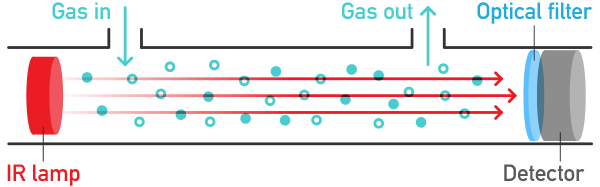
NDIR TX: 3946PPM
Now STM32 receives that same data in UART2 RX line. The problem was that I needed to use only the integer value (3946) and ignore the String Chars “PPM”.
Extracting Only the Integer Value
At beginning I had no idea how to separate the number part from the string of ndir output. I was receiving the full string in UART buffer like "NDIR : 3946 PPM" , and when I trying to use it directly, but it gives a wrong result.
After trying different method, I found a C function is atoi() (ASCII to integer). This function used to reads the characters from string or a text and converts them into integer until it meet any non-digit character. So if the string is "3946 PPM", then the atoi() function will gives 3946.
This is exactly I needed.
The code snippet that used for me:
char rx_buffer[50];
int ndir_value = 0;

void HAL_UART_RxCpltCallback(UART_HandleTypeDef *huart){
    if (huart->Instance==USART2){
        ndir_int_value = atoi(rx_buffer); // extract only the integer part
        processData(ndir_int_value);
        HAL_UART_Receive_IT(&huart2,(uint8_t*)rx_buffer,sizeof(rx_buffer));
    }
}
Now I got the NDIR ppm int value and ready to use in my project code.
Processing and Transmitting the Data
Once I got the integer ppm value, I wanted to combine it with other sensor data and send everything through another UART, which is UART1 in my STM32. For example, I was also reading flow and motor status. So I wanted to send data like:
MOTOR ON, FLOW 20%, NDIR 3946 PPM
To do this, I just used normal sprintf() function to format all the data in one string and transmit through UART1:
char tx_buffer[100];
sprintf(tx_buffer, "Motor ON, Flow sensor %d%%, NDIR %d PPM\r\n", flow_percent, ndir_int_value);
HAL_UART_Transmit(&huart1,(uint8_t*)tx_buffer,strlen(tx_buffer),100);
Now the UART1 continuously transmits the combined data to another device like display, PLC or serial monitor, RS485 and more.. through the UART interface like use of USB-TTL Converter.
Why This Method is Useful
This concept became very useful for my industrial projects. Because many sensors in industry have UART output besides analog current loop. Using UART data makes the system more accurate and stable because there is no analog noise or offset.
Also, with this UART-to-UART method, you can make STM32 as a small data hub, one UART reads the sensor data, process it, and another UART sends it to control system or display in same time.
Even if multiple UARTs are available (like UART2, UART3, UART4), you can chaining many sensors together.
Lessons I Learned
At the start, I was trying to use 4–20mA analog output directly, but that approach did not fit my system because I did not have converter module. I wasted some time testing ADC readings and realized it was not working.
Then I tried reading UART output from NDIR and found this solution. Now I feel this method is much better and cleaner for embedded applications, especially when the sensor already supports serial communication.
I also learned that understanding baud rate and serial buffer is very important. If baud rate mismatch or buffer overflow happens, data will become garbaged and that data cant readable. So now I always double-check both sensors and microcontroller UART configuration correctly in IOC (.ioc file in stm project) before wiring.
Full Code Example for Dual UART Communication
#include "main.h"
#include <string.h>
#include <stdlib.h>
#include <stdio.h>
#include <stdbool.h>
extern UART_HandleTypeDef huart1;
extern UART_HandleTypeDef huart2;

/* RX buffer config */
#define RX_BUFFER_SIZE 50
char rx_buffer[RX_BUFFER_SIZE];
uint8_t rx_index = 0;
uint8_t rx_data;   // single-byte buffer used by HAL interrupt-based RX
char msg1[30];     // stores parsed NDIR  integer as string


/**
  * @brief  The application entry point.
  * @retval int
  */
int main(void)
{
  /* USER CODE BEGIN 1 */

  /* USER CODE END 1 */

  /* MCU Configuration--------------------------------------------------------*/

  /* Reset of all peripherals, Initializes the Flash interface and the Systick. */
  HAL_Init();

  /* USER CODE BEGIN Init */

  /* USER CODE END Init */

  /* Configure the system clock */
  SystemClock_Config();

  /* USER CODE BEGIN SysInit */

  /* USER CODE END SysInit */

  /* Initialize all configured peripherals */
  MX_GPIO_Init();
  MX_ADC1_Init();
  MX_USART1_UART_Init();
  MX_USART2_UART_Init();

  HAL_UART_Receive_IT(&huart1, &rx_data, 1); //matches huart->Instance == USART1

  /* USER CODE END 2 */

  /* Infinite loop */
  /* USER CODE BEGIN WHILE */
  while (1)
  {
    /* USER CODE END WHILE */

	  char msg[150]; // Removed: Duplicate declaration of msg
	  char DataOut[150];
	       // Removed: uint32_t AD_RES[4]; Already  declared globally
	       // Removed: uint8_t i; Already declared globally

	           snprintf(msg, sizeof(msg),
	               "PRESSURE1: 20 BAR, PRESSURE2: 40 BAR, FLOW: 1 LPM, PWM FOR MOTOR: 20%, RELAY STATUS: ON, NDIR: %s PPM\r\n",msg1
	           );

	           snprintf(DataOut, sizeof(DataOut),
	       	               "P1: 20 BAR, P2: 40 BAR, F: 1 LPM, PWM: 20%, R: ON, NDIR: %s PPM\r\n",msg1
	       	           );

	           HAL_UART_Transmit(&huart2, (uint8_t *)msg, strlen(msg), HAL_MAX_DELAY);
	           HAL_UART_Transmit(&huart1, (uint8_t*)DataOut, strlen(DataOut), HAL_MAX_DELAY);
	       }

	       HAL_Delay(1000);
  }
  /* USER CODE END 3 */
}

/* -------------------------------------------------------------------------
 * USART initialization functions
 * -------------------------------------------------------------------------*/

void MX_USART1_UART_Init(void)
{
  huart1.Instance = USART1;
  huart1.Init.BaudRate = 9600; /* Set to NDIR sensor baudrate */
  huart1.Init.WordLength = UART_WORDLENGTH_8B;
  huart1.Init.StopBits = UART_STOPBITS_1;
  huart1.Init.Parity = UART_PARITY_NONE;
  huart1.Init.Mode = UART_MODE_TX_RX;
  huart1.Init.HwFlowCtl = UART_HWCONTROL_NONE;
  huart1.Init.OverSampling = UART_OVERSAMPLING_16;
  if (HAL_UART_Init(&huart1) != HAL_OK)
  {
    Error_Handler();
  }
}

void MX_USART2_UART_Init(void)
{
  huart2.Instance = USART2;
  huart2.Init.BaudRate = 115200; /* Set to your telemetry / host baudrate */
  huart2.Init.WordLength = UART_WORDLENGTH_8B;
  huart2.Init.StopBits = UART_STOPBITS_1;
  huart2.Init.Parity = UART_PARITY_NONE;
  huart2.Init.Mode = UART_MODE_TX_RX;
  huart2.Init.HwFlowCtl = UART_HWCONTROL_NONE;
  huart2.Init.OverSampling = UART_OVERSAMPLING_16;
  if (HAL_UART_Init(&huart2) != HAL_OK)
  {
    Error_Handler();
  }
}
/* -------------------------------------------------------------------------
 * Helper transmit functions
 * -------------------------------------------------------------------------*/

static inline void UART1_SendString(const char *s)
{
    HAL_UART_Transmit(&huart1, (uint8_t*)s, strlen(s), HAL_MAX_DELAY);
}

static inline void UART2_SendString(const char *s)
{
    HAL_UART_Transmit(&huart2, (uint8_t*)s, strlen(s), HAL_MAX_DELAY);
}

/* -------------------------------------------------------------------------
 *  Interrupt-based RX handling for the receiving ASCII NDIR like "3946PPM" or
 * commands terminated by '\r'. This callback expects  HAL_UART_Receive_IT
 * to be primed for &rx_data, 1 byte.
 * -------------------------------------------------------------------------*/

void HAL_UART_RxCpltCallback(UART_HandleTypeDef *huart)
{
    if (huart->Instance == USART1) /* Data from NDIR sensor on USART1 */
    {
        if (rx_data == '\r' || rx_data == '\n')  /* End of frame */
        {
            rx_buffer[rx_index] = '\0';  /* Null-terminate string */

            /* Convert leading integer part only (e.g. "3946PPM" -> 3946) */
            int value = atoi(rx_buffer);

            /* Store parsed value as string to reuse in main app */
            snprintf(msg1, sizeof(msg1), "%d", value);
            /* Clear index & buffer for next frame */
            rx_index = 0;
            memset(rx_buffer, 0, RX_BUFFER_SIZE);
        }
        else
        {
            /* Accumulate bytes until buffer full or terminator */
            if (rx_index < RX_BUFFER_SIZE - 1)
            {
                rx_buffer[rx_index++] = rx_data;
            }
            else
            {
                /* overflow: reset */
                rx_index = 0;
                memset(rx_buffer, 0, RX_BUFFER_SIZE);
            }
        }
        /* Re-arm reception for next byte */
        HAL_UART_Receive_IT(&huart1, &rx_data, 1);
    }
}

/* -------------------------------------------------------------------------
 * Usage notes:
 * - Call MX_USART1_UART_Init() and MX_USART2_UART_Init() during system init.
 * - After init, prime the interrupt RX: HAL_UART_Receive_IT(&huart1, &rx_data, 1);
 * - Use msg1 (string) or atoi(msg1) in your main loop when forming outgoing
 *   messages for the other UART (huart2) or telemetry.
 * - For higher throughput or many sensors consider using DMA RX with ring
 *   buffer instead of byte-wise interrupts.
 * -------------------------------------------------------------------------*/
Applications and Future Use
This technique is not only for the NDIR sensors. You can use same logic for any industrial sensor that gives serial output like CO2 sensor, pressure transmitter, flow meter, or temperature sensor.
Even you can expand it to read multiple UART sensors and combine them into the one unified string for Modbus or cloud monitoring.
In my next plan, I want to add a small OLED display to show the values in real-time, and maybe send data through RS485 using same STM32.
Conclusion
This project taught me a lot about the UART communication in industrial use and data parsing in embedded systems and IoT. Sometimes the direct hardware paths (like using ADC for 4–20mA) is not always good, especially when there is already a digital option available.
By using UART-to-UART Tx which mean transfer, I was able to read the NDIR sensor value and extract only the integer part using the atoi(), and then send it along with the other sensor data in a formatted msg. This small idea saved me from building analog converter circuits and made my design more simple and stable.
Refer STM UART: ST Microelectronics HAL UART Documentation
Now, my STM32 mcu board receives data from NDIR at 9600 baud on UART2, process it, and transmits combined data on UART1 at 115200 baud for other control systems and read/view in serial monitor using USB-TTL module. The concept is clean and works perfectly for the industrial environments.
Learn More: another STM32 tutorial
Sometimes, the best solution comes after few trials and more mistakes. This UART-based approach is one of them, and now I am using it as a base for my next industrial controller development.