Table of Contents
1. Introduction
1.1 Overview
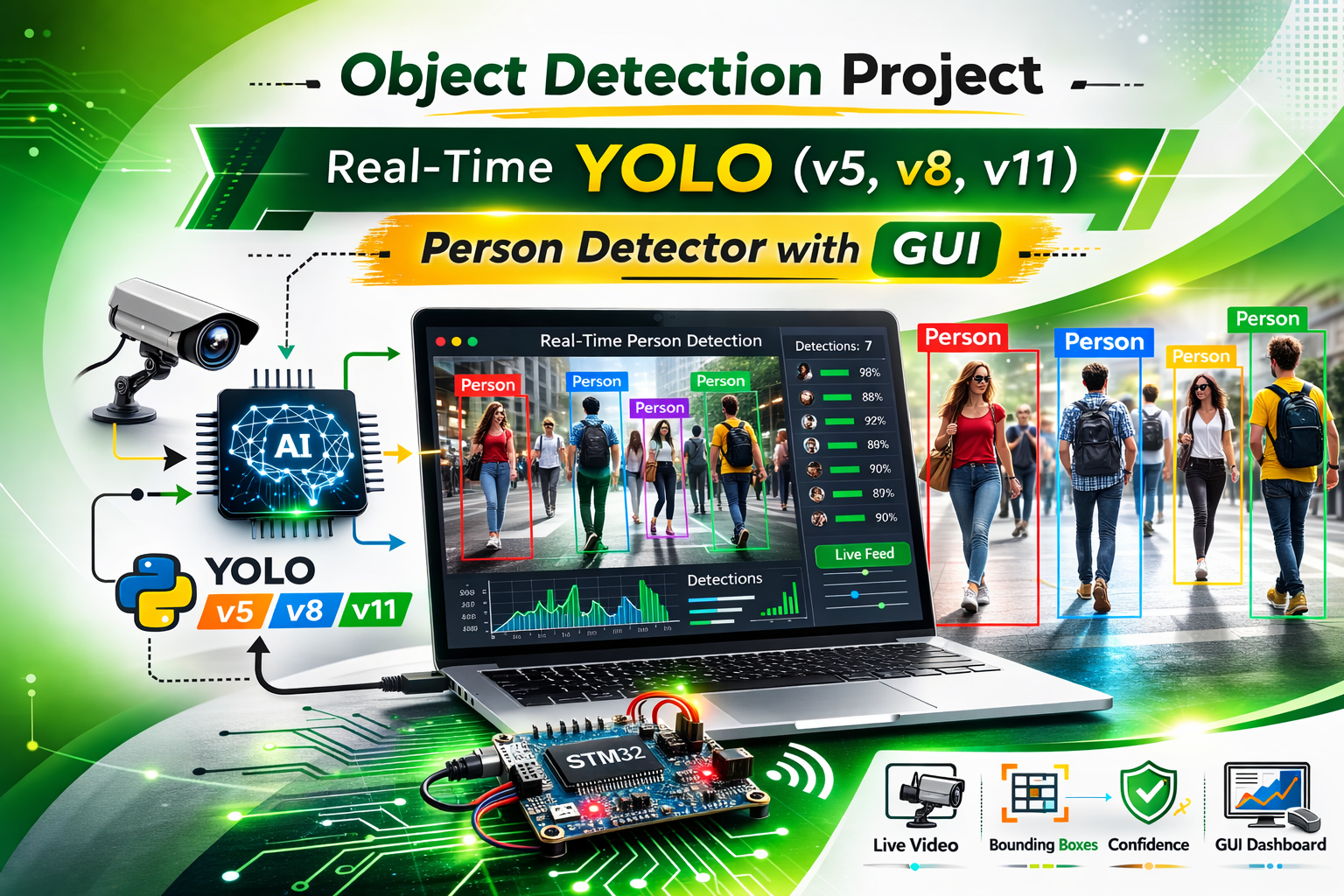
Real-time object detection has become a cornerstone of modern computer vision applications, especially in embedded systems, IoT devices, industrial automation, and smart monitoring. Unlike static image processing, real-time detection requires handling continuous video frames, low-latency processing, and instant feedback. In this project, I developed a Python desktop application that detects objects from a webcam feed using YOLO (You Only Look Once) models, including YOLOv5, YOLOv8, and YOLOv11. The application plays an audible beep whenever a person is detected. This combination of real-time detection and event-driven alerts makes it ideal for safety monitoring, industrial surveillance, and edge AI experiments.
The project integrates multiple components such as GUI for ease of use, AI model inference for detection, and alert mechanisms. By combining these into a cohesive application, it showcases how embedded developers and AI enthusiasts can implement practical computer vision projects. Unlike basic demos, this system emphasizes usability, portability, and real-world deployment considerations, making it a valuable reference for learners and professionals alike.
1.2 Importance of Object Detection Projects
Object detection is not only a trending topic in AI but also a high-value skill in embedded and IoT applications. For example:
- In industrial settings, detecting human presence in machinery areas can prevent accidents.
- In smart home systems, real-time detection can trigger alarms or notifications when an unauthorized person enters a room.
- For IoT edge devices, lightweight object detection with alerts can reduce cloud dependency and improve response time.
By building this project, I demonstrated how to bridge AI, embedded systems, and user interfaces, creating a solution that is both educational and practical. It also shows end-to-end workflow, from selecting a model and handling webcam frames to deploying offline installation packages, which is crucial for real-world AI applications.
2. Tech Stack and Architecture
2.1 Core Technologies
This project relies on a combination of Python programming, computer vision libraries, AI frameworks, and GUI components:
| Component | Role in Project |
|---|---|
| Python 3.10 | Core programming language for logic, AI integration, and GUI control |
| Tkinter | Desktop GUI framework to allow user interaction and control over detection |
| OpenCV | Handles video streaming from webcam, frame preprocessing, and drawing detection overlays |
| PyTorch + Ultralytics | Executes YOLO models for real-time object detection with pre-trained weights |
| winsound | Plays an audible alert when a person is detected on Windows systems if using linux to change winsound to linux os |
2.2 System Architecture
The application follows a modular architecture:
- User Interface Layer: Tkinter GUI for model selection, starting/stopping detection, and displaying status updates.
- Processing Layer: Handles webcam frame acquisition, YOLO model inference, and detection overlay rendering.
- Alert Layer: Checks for person class detections and triggers beep or notification logic with cooldown timers.
- Deployment Layer: Supports both online installation (via pip) and offline installation (wheel packages) to facilitate real-world deployment.
This separation ensures stability, maintainability, and scalability, making it suitable for expanding the project to include additional features such as email alerts, MQTT notifications, or cloud integration.
3. Features in Detail
The application is feature-rich, offering both flexibility and performance optimization. Key features include:
3.1 Multi-Model Support
The GUI allows users to choose from multiple YOLO model variants:
- YOLOv5:
yolov5n, yolov5s, yolov5m, yolov5l, yolov5x - YOLOv8:
yolov8n, yolov8s, yolov8m, yolov8l, yolov8x - YOLO11:
yolo11n, yolo11s, yolo11m, yolo11l, yolo11x
This flexibility lets users test trade-offs between speed and accuracy, which is critical in edge AI or embedded scenarios.
3.2 Real-Time Detection
The application captures webcam frames continuously and feeds them into the YOLO model. It draws bounding boxes for detected objects, overlays labels, and triggers an audible alert if a person is found. Real-time processing ensures minimal latency, which is critical for safety applications or human detection in industrial environments.
3.3 Alert System
An important aspect of the project is the alert mechanism:
- Beep alert is triggered when a person is detected.
- Cooldown logic ensures the beep does not repeat excessively.
- Alerts are easily extendable to other forms such as email, MQTT, or hardware buzzers for embedded applications.
This event-driven design demonstrates practical system integration skills, which are highly relevant in real-world AI deployments.
3.4 Offline and Online Deployment
The project supports both installation methods:
- Online Install: Dependencies installed via pip directly from PyPI.
- Offline Install: Prepackaged wheel files allow installation without internet connectivity.
This is especially useful for industrial or security environments, where internet access is restricted.
4. How the Project Works
4.1 User Workflow
- Launch the Tkinter GUI.
- Select a YOLO model from the dropdown.
- Press Start Detection to begin webcam processing.
- The system continuously analyzes frames for object detection.
- If a person is detected:
- Bounding box is drawn
- Overlay text “PERSON DETECTED” appears
- Audible beep is triggered
- Press Q in the camera window to stop detection.
4.2 Backend Workflow
The backend handles model loading, frame acquisition, inference, and rendering:
- Model Loading: Loads YOLOv5 using
torch.hubor YOLOv8/v11 viaultralytics.YOLO(). - Frame Processing: Webcam frames converted to contiguous arrays to ensure compatibility with OpenCV and prevent errors.
- Inference: Each frame is processed for object detection.
- Alerts: Detection results are checked for class
0(person) and triggers beep if found.
This real-time loop ensures efficient and continuous object detection while keeping the GUI responsive.
5. Output and Source Code
The application produces live webcam feeds with:
- Real-time bounding boxes for detected objects
- Text overlay “PERSON DETECTED” for human detection
- Audible alerts for immediate notification
Screenshot:
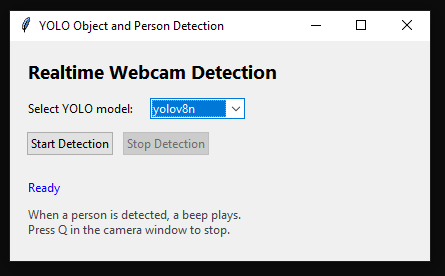
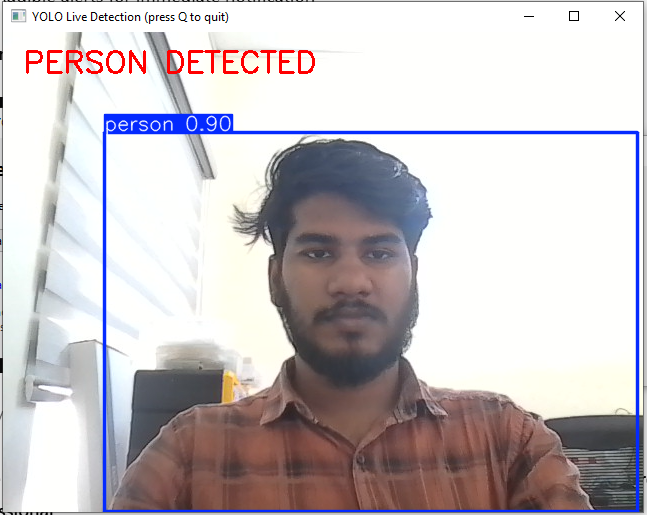
These visuals enhance user understanding and make the project documentation comprehensive and professional.
6. Applications and Use Cases
This project has numerous practical applications:
- Industrial Safety: Detect human presence near machinery
- Smart Homes: Monitor rooms for people
- IoT Edge Devices: Run lightweight detection with offline support
- Embedded AI Learning: Learn integration of GUI, AI inference, and event-driven programming
By demonstrating real-time detection, alerts, and deployment, this project can be extended for security, robotics, and monitoring solutions.
7. Next Improvements
Potential enhancements include:
- Confidence threshold slider in GUI
- Snapshot and video recording on detection
- Multiple alert types (email, MQTT, buzzer)
- Export detections to CSV for logging and analysis
- Camera source selection for USB/IP cameras
- Multi-person tracking for more advanced applications
These additions expand the project into a full-scale monitoring system.
8. Why This Project Matters
This project teaches:
- End-to-end system design from GUI to AI inference
- Event-driven programming for real-world alerts
- Portability with offline deployment
- Edge AI considerations like low-latency detection and lightweight processing
It is highly valuable for embedded AI, IoT, industrial automation, and smart surveillance roles.
9. Conclusion
The Object Detection Project combines YOLO AI models, Tkinter GUI, real-time detection, and alerts into a practical system. It demonstrates end-to-end workflow, deployment considerations, and user interaction, making it suitable for embedded, IoT, and edge AI applications. It is a production-minded project that showcases practical integration skills beyond simple AI demos.
10. References
- Ultralytics YOLO Documentation – https://docs.ultralytics.com
- OpenCV Documentation – https://opencv.org
- Python Official Documentation – https://python.org
- Tkinter Documentation – https://docs.python.org/3/library/tkinter.html
- PyTorch Documentation – https://pytorch.org
- winsound Module Docs – https://docs.python.org/3/library/winsound.html
- Detection projects – Face Recognition Attendance System Python | Complete Project with Source Code