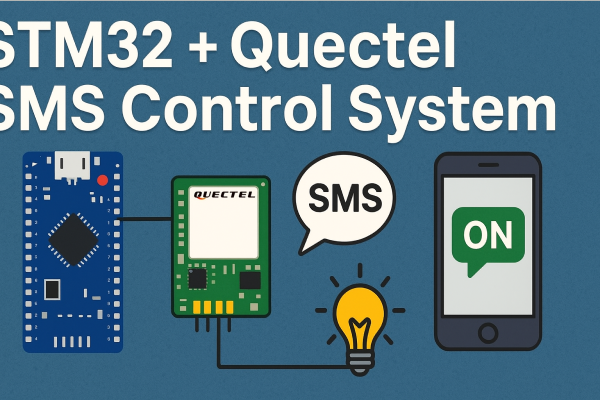
In this project, I’m going to show how I made a simple but useful system that can control GPIO peripherals using SMS messages. You can just send a message like “MOTOR ON”, “LIGHTS OFF”, or even “PC ON” from your mobile phone, and the STM32 Bluepill board will receive the SMS through the Quectel GSM module and control relays accordingly.
This project is general-purpose, so you can use it for any kind of automation where you want to control devices remotely using SMS — no Wi-Fi, no Internet, just pure GSM communication. It’s a great way to manage devices in rural areas or remote places where the Internet connection is not reliable.
GSM SMS control is still one of the simplest and most reliable ways to automate electrical devices. Whether you want to turn ON a water pump in your field or switch OFF your home lights remotely, this STM32 + Quectel project makes it possible with minimal components.
Project Idea and Goal
I wanted to build something that can control AC appliances like motors, lights, and computers by sending just an SMS. Imagine being far away from your home or office and still being able to control your devices instantly.
So, I decided to design a GSM-based device control system using the STM32F103C8T6 Bluepill microcontroller board and a Quectel GSM module like EC200U, M66, or even EC25.
The concept is straightforward:
- The STM32 board communicates with the Quectel GSM module using UART serial communication.
- When the GSM module receives a message, the STM32 reads the SMS content.
- If the message says “ON”, it activates the relay output.
- If it says “OFF”, the relay turns off.
You can expand this to multiple relays — each controlled by a different keyword in the SMS. This means you can control multiple devices (motor, light, PC, fan, etc.) independently.
Hardware Setup
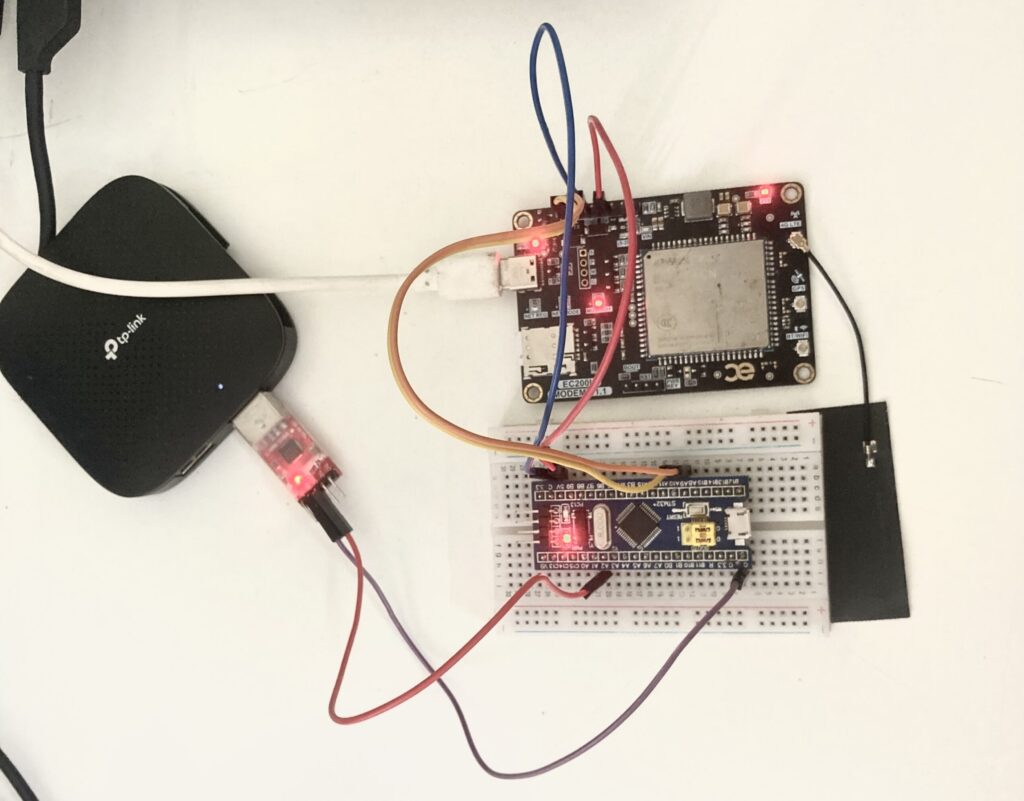
Here are the components I used to build this GSM SMS control system:
- STM32F103C8T6 Bluepill board
- Quectel GSM module (tested with EC200U, M66, EC25)
- 5V Relay module (single or multiple channels)
- Jumper wires
- 5V, 2A Power supply
- USB-to-UART converter (optional, for debugging)
The wiring is quite simple.
Wiring Connections:
| STM32 Pin | Connection | Description |
|---|---|---|
| PA9 (UART1 TX) | GSM RX | UART transmit from STM32 to GSM |
| PA10 (UART1 RX) | GSM TX | UART receive from GSM |
| PB3 | Relay input | Controls the relay |
| 5V | Relay VCC | Power for relay module |
| GND | Relay GND | Common ground |
For debugging, I connected UART2 (TX/RX) from STM32 to my PC using a USB-TTL converter so I can monitor logs and AT command responses on a serial terminal like PuTTY or STM32CubeMonitor.
GPIO Configuration
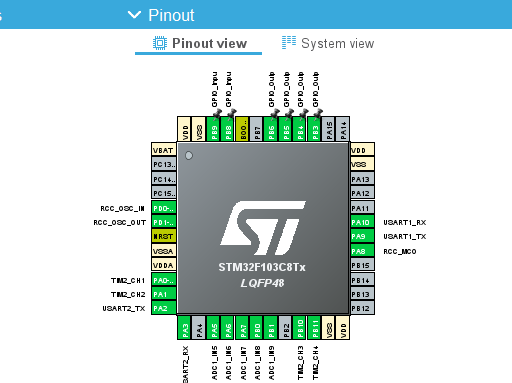
In STM32CubeIDE, I configured GPIOB pins 3–6 as outputs for relay control. Here’s a snippet of my initialization code:
HAL_GPIO_WritePin(GPIOB, GPIO_PIN_3|GPIO_PIN_4|GPIO_PIN_5|GPIO_PIN_6, GPIO_PIN_RESET);

GPIO_InitStruct.Pin = GPIO_PIN_3|GPIO_PIN_4|GPIO_PIN_5|GPIO_PIN_6;
GPIO_InitStruct.Mode = GPIO_MODE_OUTPUT_PP;
GPIO_InitStruct.Pull = GPIO_NOPULL;
GPIO_InitStruct.Speed = GPIO_SPEED_FREQ_LOW;
HAL_GPIO_Init(GPIOB, &GPIO_InitStruct);
So, GPIOB pins 3 to 6 are used as output pins. You can add more pins the same way if you want to control more relays.
How GSM Communication Works
Before jumping into the STM32 code, it’s important to understand the GSM module communication.
The Quectel GSM module (like EC200U or M66) is fully controlled using AT commands. These are simple text commands that configure and control the GSM modem. For example:
| Command | Description |
|---|---|
AT | Basic check if module is responding |
ATE0 | Disable command echo |
AT+CLIP=1 | Enable caller ID |
AT+CMGF=1 | Set SMS text mode |
AT+CNMI=2,2,0,0,0 | Receive SMS instantly via UART |
AT+CSQ | Check signal quality |
AT+CREG? | Check network registration |
AT+CMGD=1,4 | Delete all stored SMS messages |
When the STM32 sends these commands through UART, the GSM module replies with OK, ERROR, or other status messages. Once initialized, it automatically sends the received SMS content over UART to STM32.
Working Principle
Let’s go through what happens step-by-step when the project is running:
- When the STM32 starts, it sends a set of AT commands to initialize the GSM module.
- Once the module registers on the network and signal strength is OK, it waits for incoming messages.
- When a new SMS is received, the GSM module sends a URC (Unsolicited Result Code) that includes the message text.
- STM32 receives this text over UART, extracts the message, and checks for commands like “ON” or “OFF”.
- If the command matches, it activates or deactivates the GPIO pins to control the relays.
So the workflow is purely SMS-based, no Internet, no MQTT, no Wi-Fi — just reliable GSM text message control.
Example SMS control:
📩 Send “ON” → Relay turns ON
📩 Send “OFF” → Relay turns OFF
It’s that simple!
Code Overview (main.c)
The full source code is written in STM32CubeIDE using HAL libraries for GPIO and UART.
The code is a bit long, but here’s what happens in the main logic:
- Initializes peripherals (GPIO, UART1 for GSM, UART2 for Debug).
- Sends AT commands for GSM setup.
- Receives and processes incoming UART data.
- Extracts the SMS content and checks for ON/OFF commands.
- Controls the GPIO pins (relays) accordingly.
The interrupt-based UART reception ensures no data loss, even if multiple lines of AT responses or SMS messages are coming in quickly.
Here’s a simple flow of the logic:
Start System
↓
Initialize GSM (AT, ATE0, CMGF, CNMI, etc.)
↓
Wait for SMS
↓
Extract SMS content
↓
If “ON” → Set GPIO HIGH
If “OFF” → Set GPIO LOW
↓
Continue listening...
The use of interrupt-driven UART (HAL_UART_RxCpltCallback) ensures that incoming GSM data is handled efficiently and parsed line-by-line.
Testing the GSM SMS Control System
Once you flash the code into the STM32 Bluepill, connect your GSM module, insert a SIM card, and power everything up.
Open your serial terminal (at 115200 baud) on UART2 and you’ll see initialization logs like:
System Started
Sending: AT
Sending: ATE0
Sending: AT+CMGF=1
Sending: AT+CNMI=2,2,0,0,0
...end with...
System Ready...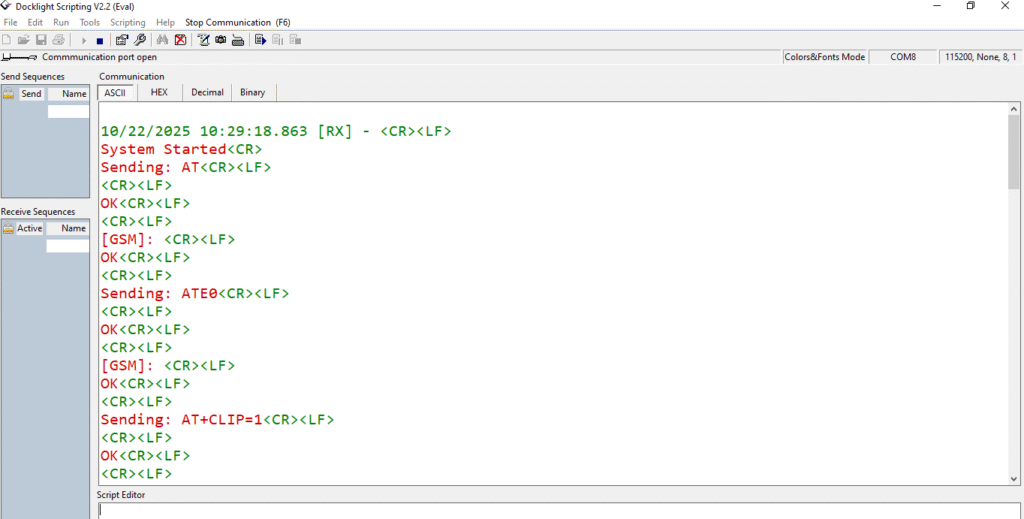
Now from your phone, send an SMS with the text ON to the SIM card number inside the GSM module.
On your serial monitor, you’ll see:
[Received SMS]: ON
Relay ON
The relay clicks, LED turns ON, or motor starts running.
Then send OFF, and you’ll get:
[Received SMS]: OFF
Relay OFF
The relay deactivates, and the load turns OFF.
It’s quite satisfying to see a physical output react to a simple SMS — feels like magic!
Expanding the Project (Multi-Device Control)
One of the best things about STM32 is that it has many GPIO pins. So you can easily expand this project to control multiple devices using different SMS commands.
For example:
if(strcmp(message, "MOTOR ON") == 0){
    HAL_GPIO_WritePin(GPIOB, GPIO_PIN_3, GPIO_PIN_SET);
}
if(strcmp(message, "MOTOR OFF") == 0){
    HAL_GPIO_WritePin(GPIOB, GPIO_PIN_3, GPIO_PIN_RESET);
}

if(strcmp(message, "LIGHT ON") == 0){
    HAL_GPIO_WritePin(GPIOB, GPIO_PIN_4, GPIO_PIN_SET);
}
if(strcmp(message, "LIGHT OFF") == 0){
    HAL_GPIO_WritePin(GPIOB, GPIO_PIN_4, GPIO_PIN_RESET);
}
You can assign one relay per pin and control each with a unique SMS command.
This makes the system scalable — from one relay to a whole house automation setup. You can add up to 8 or even 16 relays easily with proper driver modules.
Adding Safety and Authentication
In real-life applications, you wouldn’t want anyone to send a random SMS and control your devices.
So, the next step is to add authentication.
You can store a specific authorized phone number and check the sender before acting on the SMS.
For example:
if(strstr(buffer, "+CMT: \"+919876543210\"")) {
   // Only accept messages from this number
}
This ensures only your number is trusted to send ON/OFF commands.
You can also send back acknowledgment messages using the AT+CMGS command:
- When you turn ON a relay, send “Relay ON” back to the sender.
- When turned OFF, reply “Relay OFF”.
That makes it a two-way communication system — very practical for automation.
Safety Notes for AC Loads
When you use relays to control AC mains devices, always follow safety precautions:
- Use opto-isolated relay modules to separate STM32 logic from AC lines.
- Choose relays with proper current ratings (10A or more for motors or high-wattage loads).
- Keep AC and DC circuits physically separated on your PCB or breadboard.
- Avoid touching the AC lines during testing.
Remember, the STM32 works on 3.3V logic, so always use relay boards that accept 3.3V signal input or add a transistor driver.
Why Use GSM for Automation (Instead of Internet)?
Nowadays, most IoT projects use Wi-Fi or Internet-based control (like MQTT or Blynk). But SMS-based systems still have major advantages:
✅ Works anywhere with GSM network coverage.
✅ Doesn’t need an Internet connection.
✅ Very low power consumption.
✅ No monthly cloud costs or server maintenance.
✅ Reliable and instant control via SMS.
That’s why GSM-based IoT projects are perfect for rural or industrial environments — farms, water pump systems, or power control in remote stations.
Possible Improvements and Future Upgrades
Here are some ideas for improving this SMS control system in the next versions:
- Authentication: Only accept messages from authorized numbers.
- Status reply: Send an acknowledgment SMS back (e.g., “Motor is ON”).
- EEPROM storage: Save last relay states, so after power reset it restores the same status.
- Multi-device setup: Control 4 or 8 relays with different keywords.
- Sensor feedback: Add sensors (temperature, current, voltage) and report values via SMS.
- Android app: Create a small app to send predefined commands like “LIGHT ON”, “FAN OFF”, etc.
Each of these additions makes the project more intelligent and suitable for real-life use cases.
Practical Use Cases
This STM32 + Quectel GSM project can be used for many purposes:
- Home Automation – Turn ON/OFF lights, fans, air conditioners, and computers.
- Agriculture – Start irrigation pumps remotely by sending an SMS.
- Industrial Machines – Control factory equipment without Wi-Fi.
- Security Systems – Enable or disable alarms or gates using SMS.
- Energy Saving – Switch off unused loads automatically with scheduled SMS.
The best part? It’s modular — you can modify it for any application that needs simple ON/OFF control using mobile text messages.
Troubleshooting Tips
If your GSM module doesn’t respond properly, try these checks:
- Make sure SIM card is active and has balance.
- Ensure GSM module’s baud rate matches STM32 UART configuration (115200 or 9600).
- Power supply should be stable 5V with at least 2A current.
- Check UART connections (TX ↔ RX cross-linked).
- Send
ATcommand manually through USB-TTL to test module first.
If you see “Waiting for signal…” messages, it means GSM network is weak — move antenna to open area.
Testing Result
After connecting everything and uploading the code, the system worked perfectly.
When I sent ON, the relay clicked and the LED lit up instantly.
When I sent OFF, it turned off.
On the debug terminal, messages looked like this:
[Received SMS]: ON
Relay ON
and
[Received SMS]: OFF
Relay OFF
Even after multiple SMS, it responded reliably each time.
The Quectel EC200U module handled SMS parsing quickly, and STM32 processed it in real-time without any delay.
Key Learnings
Working on this GSM SMS system taught me a lot about:
- UART-based communication between STM32 and GSM modules.
- How AT commands work internally for SMS sending/receiving.
- Parsing strings and processing data from UART interrupts.
- Safe relay interfacing with STM32 GPIOs.
- Designing IoT systems that don’t depend on Internet access.
This is a perfect beginner-to-intermediate level embedded project that introduces both hardware and communication programming in STM32.
Summary
So to summarize:
- STM32 Bluepill communicates with Quectel GSM via UART.
- Receives SMS messages like “ON” or “OFF”.
- Extracts and processes the text.
- Controls relays connected to GPIO pins.
- Allows remote control of devices anywhere using mobile SMS.
Key features:
✔ Works without Internet
✔ Reliable GSM-based control
✔ Expandable to multiple outputs
✔ Low cost and low power
✔ Easy to modify and customize
Conclusion
This STM32 + Quectel SMS Control System is a simple but powerful embedded automation project. It’s ideal for beginners who want to explore GSM communication and real-world device control without depending on Internet or Wi-Fi.
Whether you want to turn on a motor in your farm, control lights in your home, or manage industrial machines from far away — this system works anywhere there’s GSM coverage.
You can later integrate sensors, automatic responses, or even cloud connectivity, but the SMS control foundation is strong and extremely reliable.
I built the first version with just one relay, and it worked flawlessly. My next goal is to add multiple relays, include acknowledgment messages, and maybe connect it to a cloud dashboard for hybrid GSM + Internet control.
If you’re someone who loves embedded projects, IoT, and practical automation, this STM32 and Quectel GSM SMS control system is definitely worth building.
Keywords:
STM32 Bluepill, Quectel GSM, EC200U, M66, EC25, GSM SMS Control System, SMS-based automation, control devices using SMS, STM32 projects, UART AT commands, GSM IoT, remote control without Internet, GSM relay control, embedded systems, STM32 HAL code, Quectel AT commands, SMS relay switch, IoT rural automation, GSM home automation, STM32 GSM communication.