Face recognition attendance system python is a complete automated attendance-marking application designed for schools, colleges, computer labs, coaching centres, and training institutions. This project uses Python, OpenCV, Tkinter GUI, and face recognition technology to identify students through a webcam and mark their attendance instantly without manual entry.
The system captures multiple images of a student, generates facial encodings, trains them, and recognizes the student in real time. Once recognized, the system stores the attendance data in Excel sheets with the student’s details, location, and timestamp.
This downloadable project is perfect for BCA, BSc CS, MSc, MCA, BTech, MTech, Diploma, and IT final-year students as a mini or major project.
Table of Contents
- Project Overview
- Key Features
- Abstract
- Existing System vs Proposed System
- Project Modules
- Installation Guide
- What You Receive
- Requirements-Based Customization
- FAQ Section
- Conclusion
Project Overview
The face recognition class attendance system python project replaces traditional manual attendance with a fully automated, accurate, and intelligent solution. Using a standard webcam and Python libraries, the system can identify a student’s face, validate identity, and instantly store attendance data.
This project eliminates issues like:
- Proxy attendance
- Manual errors
- Time consumption
- Difficult data handling
With easy setup and simple code structure, it becomes an ideal academic project demonstrating practical use of Python, OpenCV, and machine learning.
Key Features
🔹 Face Detection and Recognition
Automatically identifies student faces using face encodings.
🔹 GUI-Based Tkinter Interface
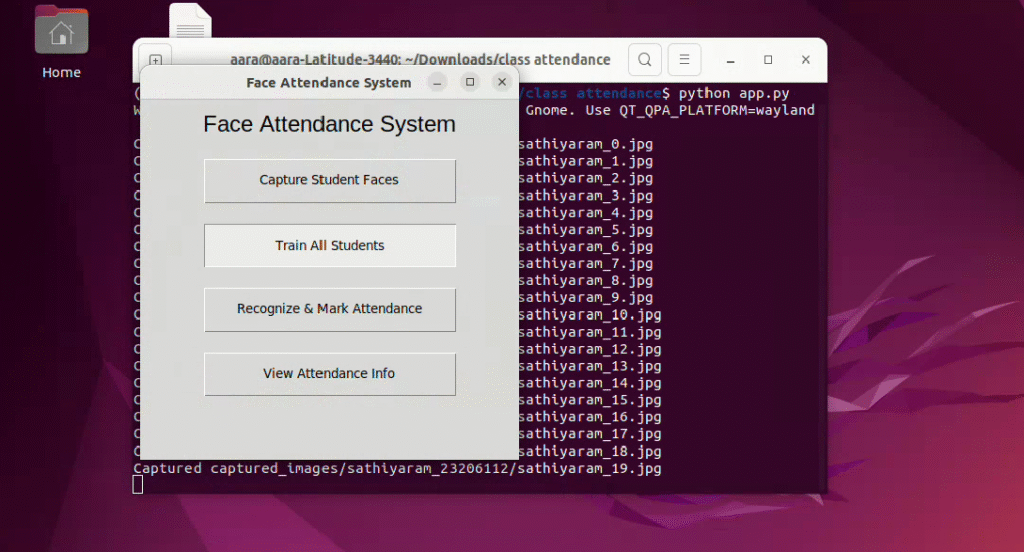
User-friendly dashboard for capturing images, training faces, and marking attendance.
🔹 Excel-Based Storage
Attendance and student details are saved in student_info.xlsx and attendance.xlsx.
🔹 Location Capture
Automatically fetches location coordinates using IP-based geolocation.
🔹 Prevents Proxy Attendance
Only the actual registered face can mark attendance.
🔹 Easy to Customize
Modify or extend modules easily based on requirements.
Abstract
This project presents a real-time face recognition attendance system python solution designed to automate attendance procedures in educational institutions. Instead of relying on manual registers, this system uses facial biometrics to identify each student during entry. The program captures images during registration, generates face encodings, trains the recognition model, and marks attendance automatically during recognition. All attendance records are stored in Excel format along with timestamps and location.
The system improves accuracy, prevents proxy attendance, saves administrative time, and ensures reliable data storage. It is lightweight, fast, and works with any standard webcam, making it suitable for colleges, schools, training centres, and workplace attendance.
Existing System vs Proposed System
The traditional attendance process commonly used in schools and institutions is entirely manual. Teachers must call out names or maintain paper-based registers, which leads to delays, errors, and difficulties in managing large batches. Manual systems are highly prone to manipulation, especially proxy attendance, where one student marks attendance for another. In addition, maintaining years’ worth of attendance data becomes difficult due to paperwork and storage limitations.
The proposed face recognition attendance system python automates the entire process. Using real-time facial recognition, attendance is marked instantly when the student stands in front of a webcam. The system generates facial encodings during registration and stores attendance securely in Excel files. It eliminates proxy attendance, increases accuracy, and reduces staff workload. The solution is scalable, efficient, and easy to integrate into existing workflows.
Project Modules
✔ Student Registration
Captures name, roll number, class, school/college name, and location.
✔ Image Capture
Collects multiple student face images through a webcam.
✔ Face Training Module
Converts images into facial encodings stored in a .pkl file.
✔ Live Recognition
Compares real-time face with trained encodings to match students.
✔ Attendance Marking
Stores name, roll number, time, date, and location automatically.
✔ Excel Storage
Exports data to attendance.xlsx for easy reporting.
✔ Data Directory Management
Automatically creates all necessary folders on startup.
Installation Guide (Step-by-Step)
Follow these steps to run the project:
1️⃣ Install Required Libraries (Refer requirements.txt)
pip install opencv-python
pip install face_recognition
pip install numpy
pip install openpyxl
pip install pandas
pip install requests
2️⃣ Download and Extract the Project Files
Place the extracted folder anywhere on your system.
3️⃣ Run the Application
Use:
python app.py
4️⃣ Start With Registration
Capture student images → Train faces → Start recognition.
5️⃣ Attendance Sheets
Generated in the data folder automatically.
What You Will Receive
✔ Full Source Code
✔ Training Images Folder
✔ Encodings Folder
✔ Excel Data Files
✔ Complete Installation Guide
✔ Project Documentation (on request)
Requirements-Based Customization
Customization options available:
- Student Login / Teacher Login
- Admin Panel
- Cloud-based attendance storage
- SMS / WhatsApp alert on attendance
- Mobile app version
- Web dashboard
- PDF attendance reports
- Multiple camera inputs
FAQ – Face Recognition Attendance System Python
1. How does this system work?
It uses face encodings created during registration. During recognition, the webcam compares faces with trained data.
2. Can this project run offline?
Yes, except the IP-based location feature requiring internet.
3. Can I customize the GUI?
Yes, it is built using Tkinter, so customization is easy.
4. Does it require a high-end computer?
No. A basic laptop with a webcam is enough.
5. Is it suitable for final-year project submission?
Absolutely. It is a complete, working and presentable academic project.
Conclusion
The face recognition attendance system python project provides a fast, secure, and modern approach to managing attendance in educational institutions. With automated face recognition, Excel-based reporting, accurate identification, and prevention of proxy attendance, it stands out as a highly practical and scalable solution. Its simple GUI and clean code structure make it ideal for learning, demonstration, and real-time implementation.
General Description
- The face recognition attendance system python project offers a modern solution to automate daily attendance using webcam-based biometric verification.
- This face recognition attendance system python software is designed to eliminate proxy attendance and increase accuracy in classrooms and training institutes.
- With the face recognition attendance system python, institutions can manage student records efficiently and maintain secure attendance logs.
- The simplicity of the face recognition attendance system python makes it ideal for final-year students looking for practical computer vision projects.
- The face recognition attendance system python combines machine learning, OpenCV, and GUI components to deliver a complete attendance solution.
Technical Explainer
- The class attendance system uses facial encoding and recognition to verify student identity in real time.
- OpenCV and Python libraries power the core functionality of the class attendance system.
- A live webcam feed helps the class attendance system capture student faces and mark attendance instantly.
- Excel-based storage allows the class attendance system to record attendance without needing a cloud server.
- The class attendance system integrates Tkinter to provide a clean, lightweight desktop interface.
External Resources
Here are useful external resources related to Python, OpenCV, and face recognition technologies:
- https://www.python.org/
- https://opencv.org/
- https://github.com/ageitgey/face_recognition
- https://numpy.org/
- https://pandas.pydata.org/
- https://openpyxl.readthedocs.io/
For more projects : Show Projects