Table of Contents
1. Introduction
1.1 Overview of Serial Communication
Serial communication system remains one of the most widely used interfaces in embedded systems, industrial controllers, IoT gateways, GSM modules, PLC systems, and field-level devices. Engineers working with UART, RS232, and RS485 interfaces depend on reliable serial communication to exchange data between microcontrollers, sensors, industrial instruments, and communication modules.
Monitoring serial data, validating protocol responses, debugging firmware behavior, and logging communication traffic are essential during product development and industrial deployment. However, developers often rely on multiple standalone tools to perform these tasks, which increases workflow complexity.
All-In-One Serial Lab addresses this challenge by combining multi-COM serial monitoring, GSM AT command testing, and Modbus RTU operations into a single desktop platform built using Electron and Node.js. The system provides a modern interface, secure process isolation, and high-performance serial data handling suitable for industrial environments.
2. Existing System Analysis
2.1 Common Tools Used in Serial Development
In typical development environments, engineers use separate applications such as basic serial terminals, dedicated Modbus RTU testing software, GSM AT command consoles, and standalone data loggers. Each tool performs a specific function but lacks integration.
2.2 Limitations of Existing Systems
The following table highlights the common limitations of traditional serial communication tools:
| Feature | Traditional Tools | Impact on Development |
|---|---|---|
| Single COM Support | Yes (mostly) | Cannot monitor multiple devices |
| GSM AT Testing | Separate tool required | Workflow fragmentation |
| Modbus RTU | Dedicated software needed | Increased tool dependency |
| Response Verification | Not available | Manual validation required |
| High Baud Rate Stability | UI freeze possible | Reduced debugging efficiency |
| Structured Logging | Limited | Difficult traceability |
| Port Conflict Handling | Weak | COM port lock issues |
Most existing tools are not optimized for concurrent multi-port communication. At higher baud rates such as 460800 or 921600, continuous data streams may cause UI lag or freezing. Logging mechanisms are often unstructured, and response verification must be performed manually.
These limitations justify the need for a unified and optimized serial testing platform.
3. Proposed System: All-In-One Serial Lab
3.1 System Objectives
The primary objective of All-In-One Serial Lab is to provide a unified serial communication testing environment that integrates monitoring, protocol validation, and logging into one application. The system reduces dependency on multiple tools and enhances debugging efficiency.
3.2 Key Features
The core features of the proposed system are summarized below:
| Module | Description | Use Case |
|---|---|---|
| Multi-COM Serial Monitor | Supports up to four concurrent ports | Gateway and multi-device testing |
| GSM AT Command Module | Preset and custom AT commands | SIMCom and Quectel modem validation |
| Modbus RTU Tool | Register read/write and raw frame support | PLC and industrial sensor testing |
| RAW/TEXT/HEX Viewer | Multiple data visualization modes | Binary protocol debugging |
| Timestamp Logger | Structured TX/RX logging | Manufacturing validation |
| Response Verification | Timeout and retry logic | Automated testing workflows |
The integration of these modules into a single environment significantly improves workflow continuity and system reliability.
4. System Architecture
4.1 Architecture Design
The application follows Electron’s secure architecture model by separating responsibilities between the main process and renderer process.
| Component | Responsibility |
|---|---|
| Main Process | Serial hardware access and protocol execution |
| Renderer Process | UI rendering and user interaction |
| IPC Channel | Secure communication between processes |
| SerialPort Library | Hardware-level serial communication |
| modbus-serial Library | Modbus RTU protocol handling |
This separation ensures stable performance and secure handling of system resources.
4.2 Performance Optimization Strategy
To prevent UI freezing under continuous data flow, incoming serial data is processed using batched buffering techniques. Data is queued and flushed at approximately 40-millisecond intervals, reducing rendering overhead and maintaining smooth user experience.
5. Working Flow
5.1 Application Initialization
When the application starts, the Electron framework initializes the main process. The native application menu is loaded, and the primary window is created. An initial serial monitoring panel is rendered to allow user configuration.
5.2 Serial Port Configuration
Users select the desired COM port and configure communication parameters such as baud rate, data bits, parity, and stop bits. The system validates port availability and securely opens the connection. Each active port is stored within a connection state map to prevent conflicts.
5.3 Data Transmission Process
Users can transmit data in either STRING or HEX mode. Optional line endings such as CR, LF, or CRLF may be appended automatically. Repeat count and transmission delay options allow controlled packet sending. If response verification is enabled, the system monitors incoming data buffers and validates responses within a configurable timeout period.
5.4 Data Reception Process
Incoming serial data is handled in the main process. The data is queued and flushed in batches to the renderer process. The system converts received data into RAW, TEXT, and HEX formats for flexible debugging. Logs are updated both at the panel level and in a centralized global log view.
5.5 Protocol Operations
The GSM AT command module enables preset command execution such as signal strength checks and network registration status queries. Custom AT commands can also be executed with response validation.
The Modbus RTU module supports holding register read, input register read, single register write, multiple register write, and raw HEX frame transmission. Results are displayed in structured format and logged for traceability.
6. Logging and Export System
6.1 Logging Features
All transmission and reception data are stored with precise timestamps. Logs are categorized by panel and also available in a unified global view.
6.2 Export Capabilities
Users can export logs in TXT or CSV format for documentation, testing reports, or production validation records.
| Export Type | Purpose |
|---|---|
| TXT | Raw session record |
| CSV | Structured analysis and reporting |
7. Applications and Use Cases
All-In-One Serial Lab is suitable for embedded firmware debugging, industrial automation testing, IoT gateway validation, GSM modem integration, PLC communication verification, and manufacturing quality control systems.
Engineers can use the tool to simultaneously monitor master and slave devices, validate Modbus register transactions, and test GSM module communication without switching between multiple applications.
8. Output and Source code
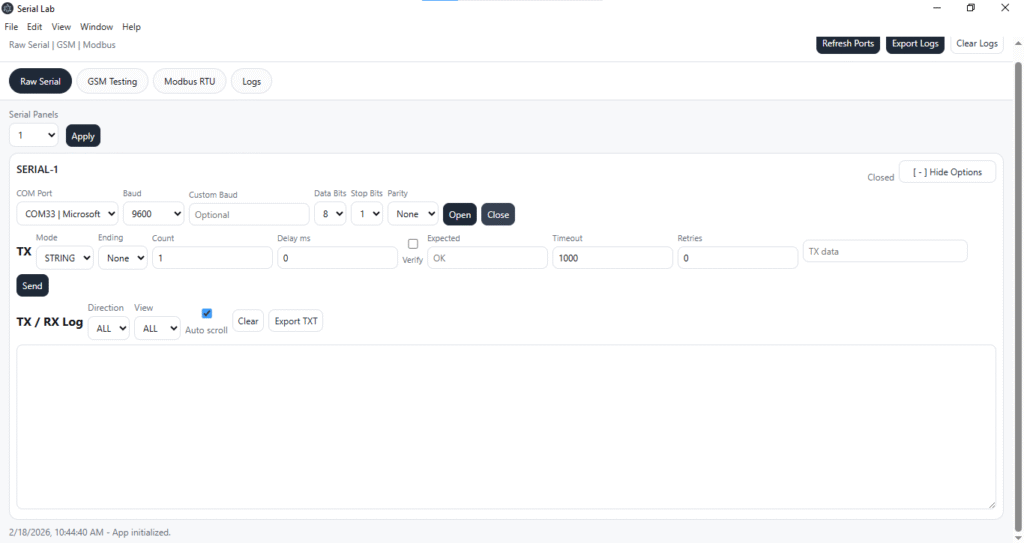
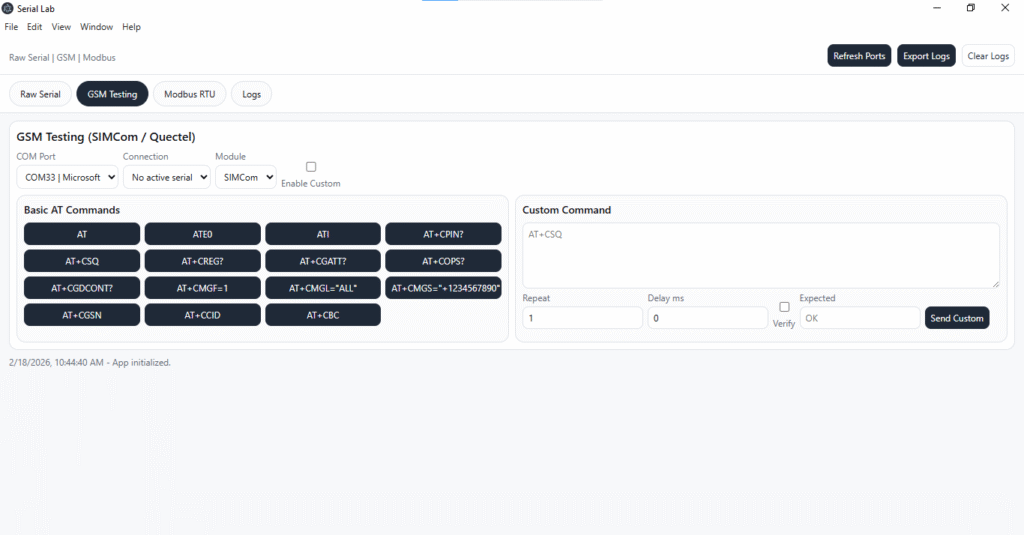
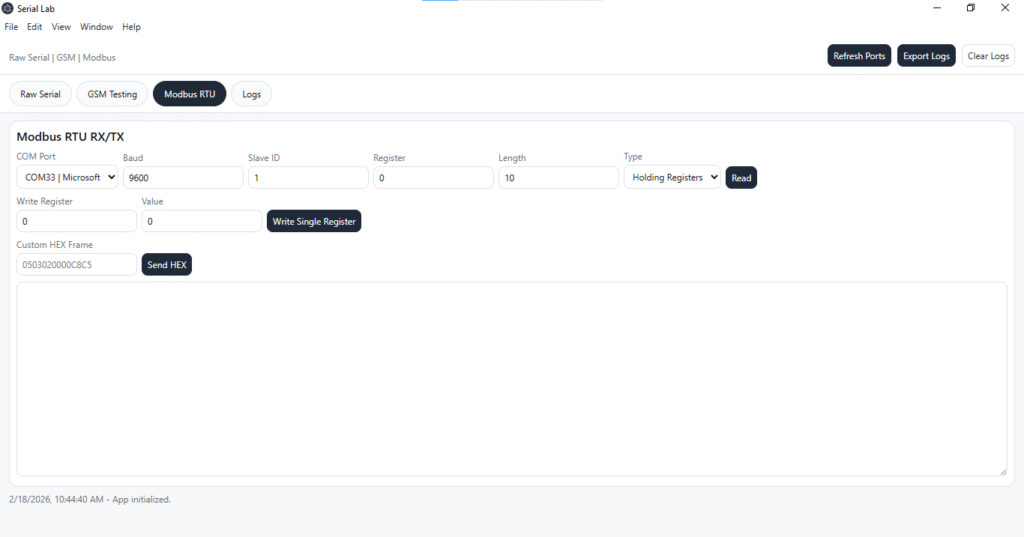
For Documentation visit Vandhupar.com on Instagram
9. Future Enhancements
Future development plans include configuration profile saving, automation scripting support, scheduled command execution, virtualized log rendering for large datasets, and plugin-based architecture expansion. These enhancements will transform the platform into a full-scale serial protocol testing laboratory.
10. Conclusion
All-In-One Serial Lab delivers a comprehensive and performance-optimized solution for serial communication testing. By integrating multi-COM monitoring, GSM AT command testing, and Modbus RTU operations into a unified desktop application, the system significantly improves debugging efficiency and workflow stability.
Its secure Electron architecture, batched data handling mechanism, and structured logging capabilities make it suitable for embedded development, industrial automation testing, IoT validation, and manufacturing environments. The platform serves not merely as a serial terminal but as a complete serial protocol testing laboratory for modern engineering applications.
11. References
- Electron.js. Electron Documentation. Available at: https://www.electronjs.org/docs
- Node.js Foundation. Node.js Official Documentation. Available at: https://nodejs.org
- SerialPort.io. SerialPort Library Documentation. Available at: https://serialport.io
- Modbus Organization. Modbus Application Protocol Specification V1.1b3. Available at: https://modbus.org
- npm. modbus-serial Package Documentation. Available at: https://www.npmjs.com/package/modbus-serial
- SIMCom Wireless Solutions. SIMCom AT Command Manual. Available from official SIMCom documentation portal.
- Quectel Wireless Solutions. Quectel AT Command Manual. Available from official Quectel documentation portal.
- GSM Connectivity Testing Tool – Complete Friendly Guide for AT Commands, GSM Modules, APN Setup & HTTP Testing